RAG for Large PDFs: A Navigation-Based Alternative to Vector Retrieval Using PageIndex
A practical guide comparing Vector RAG and navigation based RAG for large PDFs, showing how a hierarchical PageIndex lets LLMs locate answers inside structured documentation without relying on vector databases or similarity search.
Large Language Models are surprisingly capable, but only when the correct information is present inside the prompt.
That is exactly why Retrieval Augmented Generation exists. Instead of stuffing an entire document into a prompt, a system fetches only the relevant parts of the document at question time and provides them to the model.
Most modern RAG systems rely on vector search. For many real applications this works very well. FAQ bots, internal documentation assistants, support tools, and conversational search all benefit from semantic retrieval.
However, while working with long technical PDFs, we ran into a different type of problem. The limitation was not reasoning. The limitation was structure.
Technical documentation is not written like articles or blog posts. It is organized like a system:
- chapters
- configuration sections
- reference tables
- appendices
- cross references
When a human reads documentation, they rarely search using wording similarity. They navigate.
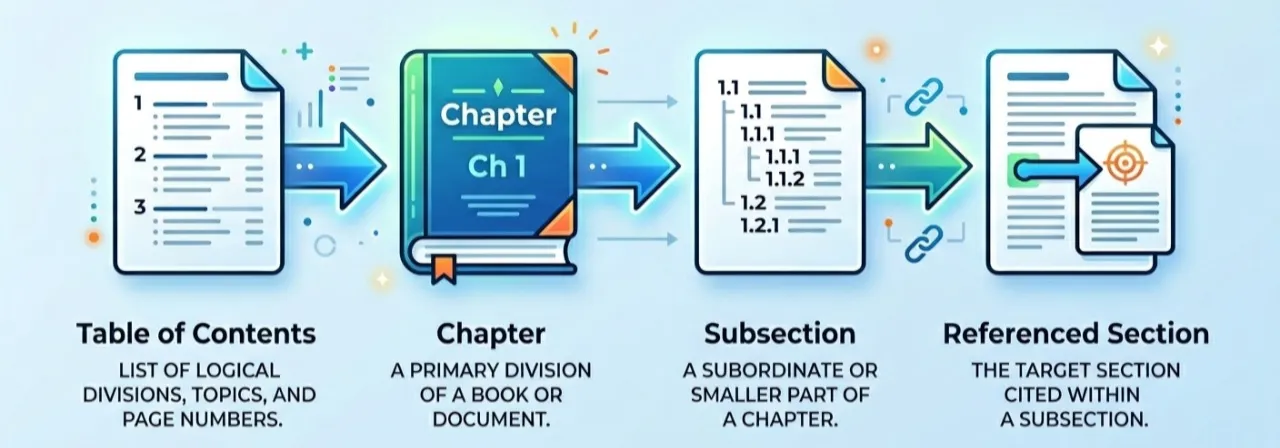
Similarity retrieval finds text that sounds like the question.
Navigation finds the place where the answer actually lives.
This article explains how we built a navigation based RAG approach using a hierarchical PageIndex. The idea is simple: instead of retrieving text once, the model decides what to read next.
A Quick Reminder: How Traditional RAG Works
A typical vector RAG pipeline has two stages. Read More regarding RAG
Indexing
- Split the document into chunks (usually 500 to 1000 tokens)
- Convert each chunk into embeddings
- Store them inside a vector database
Querying
- Convert the user question into an embedding
- Retrieve top K similar chunks
- Provide those chunks to the model
- Generate an answer
This works whenever wording similarity matches relevance. Conversational text usually behaves this way because questions and answers share vocabulary.
Large documentation often does not.
Where Similarity Retrieval Breaks Down
Vector search retrieves semantically similar text. In many domains that is exactly what we want.
Technical documentation behaves differently. Users ask conceptual questions, but the document stores information structurally.
Example question:
Where is MVC routing configured?
The answer may exist under a section titled:
Application startup pipeline configuration
The wording is different, but the location is correct.
During experiments we repeatedly saw four recurring problems.
1. Query–Structure Mismatch
The question language and the document organization use different vocabulary. The model searches for similar text while the answer is placed according to system design.
2. Fragmented Context
Configuration may be defined in one section, explained in another, and demonstrated in an example later. Retrieving a single paragraph removes important context and the model fills gaps with guesses.
3. Cross‑References
Documentation frequently contains references like:
- see Appendix A
- refer Table 5.2
- continue in configuration section
Similarity retrieval cannot follow references because references are structural relationships, not semantic similarity.
4. Multi‑Step Answers
Some questions require reading multiple connected sections. A one‑time retrieval returns isolated fragments, but the model needs a reading process.
The challenge is not that vector search is incorrect. The challenge is that documentation retrieval is a navigation problem rather than a matching problem.
The Core Idea: Retrieval as Navigation
Humans do not answer questions from a 500‑page manual by searching random paragraphs. They progressively narrow down the location of information:
- Look at the table of contents
- Pick a relevant chapter
- Read a section
- Follow references
- Verify the answer
The important difference is this:
Instead of asking which text is similar? we ask where should we read next?
This is the idea behind a PageIndex‑style RAG system.
PageIndex: A Hierarchical Document Index
PageIndex is a reasoning oriented retrieval approach for long structured documents. Instead of similarity search, the document is converted into a tree like index that represents its structure.
The model reasons over this structure and decides where to read.
Because retrieval happens through navigation, the process becomes explainable. We can see exactly why the model opened a particular section. The system does not require a vector database and does not rely on embedding chunks.
Important clarification: This is not the official PageIndex research implementation. We built an engineering approach inspired by the same idea using standard LLM tooling.
Instead of storing embeddings, we generate a machine readable table of contents.
Each node in the index contains:
- node id
- section title
- start page
- end page
- child sections
The index does not store text. It stores locations.
The mapping becomes:
node → pages → raw document text
The model first reasons about location, and only then reads the document.
Example PageIndex (Generated ToC)
Below is a simplified real example of the hierarchical index generated from a technical document:
{
  "toc": {
    "nodes": [
      {
        "node_id": "1",
        "title": "Introduction",
        "start_index": 4,
        "end_index": 5,
        "children": []
      },
      {
        "node_id": "2",
        "title": "Project Structure",
        "start_index": 6,
        "end_index": 7,
        "children": []
      },
      {
        "node_id": "3",
        "title": "Controllers",
        "start_index": 8,
        "end_index": 25,
        "children": [
          {
            "node_id": "3.1",
            "title": "Creating Controllers",
            "start_index": 8,
            "end_index": 10,
            "children": []
          },
          {
            "node_id": "3.2",
            "title": "Routing",
            "start_index": 11,
            "end_index": 25,
            "children": [
              {
                "node_id": "3.2.1",
                "title": "RouteConfig and Parameter Routing",
                "start_index": 11,
                "end_index": 12,
                "children": []
              },
              {
                "node_id": "3.2.2",
                "title": "Route Attributes (RoutePrefix, Optional, Constraints)",
                "start_index": 21,
                "end_index": 25,
                "children": []
              }
            ]
          }
        ]
      },
      {
        "node_id": "4",
        "title": "Views and View Data",
        "start_index": 13,
        "end_index": 20,
        "children": []
      }
    ]
  }
}
Each node represents a section of the document and points to a page range. Instead of retrieving paragraphs using similarity, the system first selects a node and then reads the pages referenced by that node.
For example, a question about routing would likely lead the model to:
Controllers → Routing → RouteConfig and Parameter Routing (pages 11–12)
The Iterative Reasoning Loop
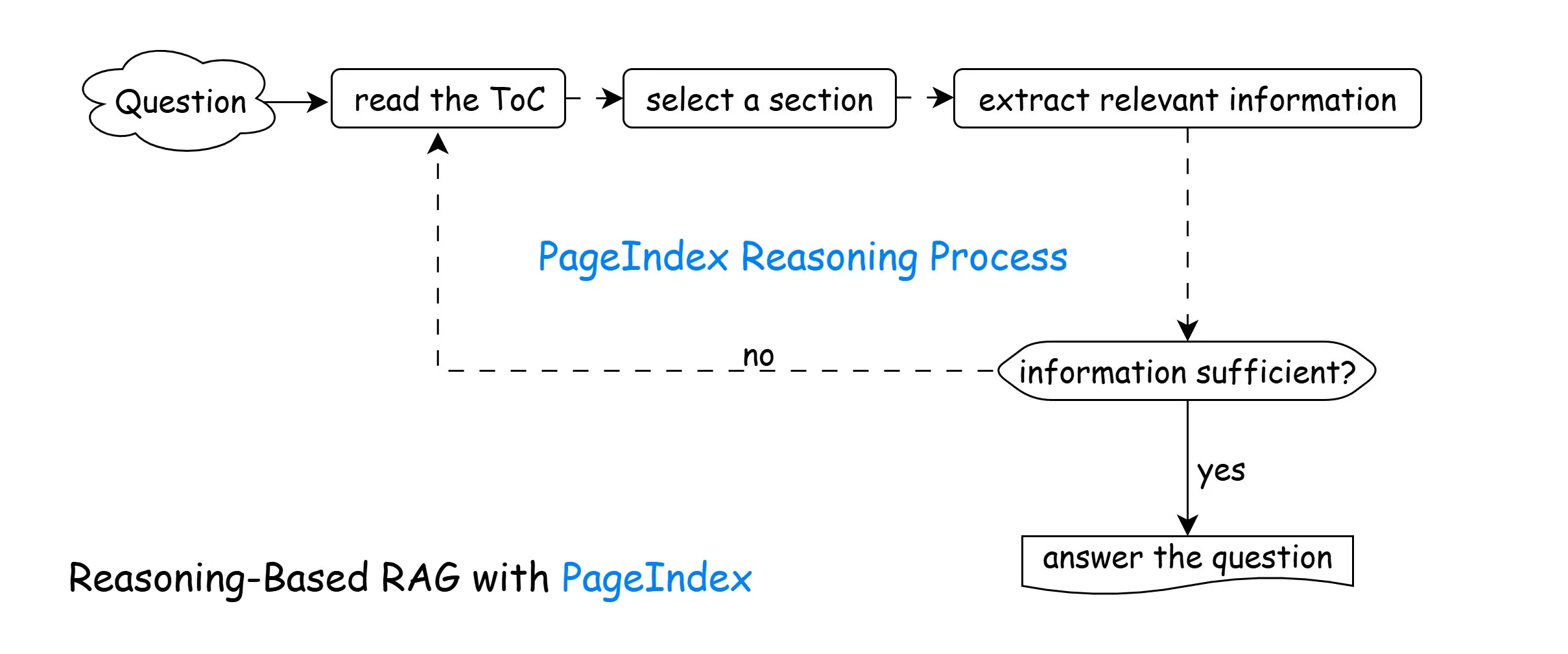
The system performs retrieval in multiple steps instead of a single search:
- Read the document structure
- Predict the most relevant section
- Retrieve that section
- Evaluate if the answer is sufficient
- If not, navigate again
- Produce the final answer
The model is not retrieving once. It is investigating the document.
Implementation Overview
The implementation uses a reasoning loop driven by a graph workflow and standard PDF page extraction.
Step 1: Initialize the Model
from langchain_openai import AzureChatOpenAI
import os

llm = AzureChatOpenAI(
    azure_endpoint=os.getenv("AZURE_ENDPOINT"),
    api_key=os.getenv("AZURE_API_KEY"),
    temperature=0,
    azure_deployment="gpt-5-nano",
    api_version="2025-04-01-preview"
)
The model acts as a planner. It decides what to read before attempting to answer.
Step 2: Generate the PageIndex (Hierarchical ToC)
We provide short snippets from each page and ask the model to build a structured table of contents.
def generate_toc(pages: Dict[str, str], doc_name: str) -> Dict:
    snippets = build_snippets(pages)

    human_prompt = (
        f"Document name: {doc_name}\n\n"
        "Here are partial snippets from each page of the document:\n"
        f"{snippets}\n\n"
        "Produce a hierarchical PageIndex with node_id, title, start_index, end_index."
    )

    structured_llm = llm.with_structured_output(PageIndexToc)
    response = structured_llm.invoke([
        SystemMessage(content="Build a hierarchical table-of-contents."),
        HumanMessage(content=human_prompt),
    ])

    return response.model_dump()
This replaces chunk embeddings. We now know where information lives.
Step 3: Navigation (Deciding What to Read)
def navigate_toc(state: PageIndexState) -> PageIndexState:
    prompt = (
        "You are deciding which sections to read next.\n\n"
        f"Question:\n{state['question']}\n\n"
        f"PageIndex:\n{state['toc']}\n\n"
        "Choose at most 3 relevant node_ids."
    )

    structured_llm = llm.with_structured_output(SelectedNodes)
    response = structured_llm.invoke([
        SystemMessage(content="Select relevant sections."),
        HumanMessage(content=prompt),
    ])

    return {"selected_nodes": response.node_ids, "iterations": state["iterations"] + 1}
The model predicts a location before retrieving any text.
Step 4: Section Retrieval
def retrieve_sections(state: PageIndexState) -> PageIndexState:
    toc_dict = json.loads(state["toc"])
    nodes_by_id = flatten_toc_nodes(toc_dict)

    new_chunks = []
    for node_id in state.get("selected_nodes", []):
        node = nodes_by_id.get(str(node_id))
        start_index = int(node.get("start_index", 0))
        end_index = int(node.get("end_index", start_index))

        page_texts = [state["pages"][str(i)] for i in range(start_index, end_index + 1)]
        combined = "\n\n".join(page_texts)
        new_chunks.append(combined)

    return {"collected_info": new_chunks}
Instead of retrieving small fragments, we retrieve complete logical sections.
Step 5: Sufficiency Check and Answering
def evaluate_and_answer(state: PageIndexState) -> PageIndexState:
    recent_context = "\n\n---\n\n".join(state.get("collected_info", [])[-6:])

    user_prompt = (
        f"Question:\n{state['question']}\n\n"
        "Relevant excerpts:\n"
        f"{recent_context}\n\n"
        "If enough information exists, answer. Otherwise respond NEED_MORE_INFO"
    )

    response = llm.invoke([HumanMessage(content=user_prompt)])
    content = str(response.content).strip()

    if "NEED_MORE_INFO" in content.upper():
        return {"answer": "", "is_sufficient": False}

    return {"answer": content, "is_sufficient": True}
The model explicitly checks whether it has enough evidence before answering.
Step 6: The Reasoning Graph
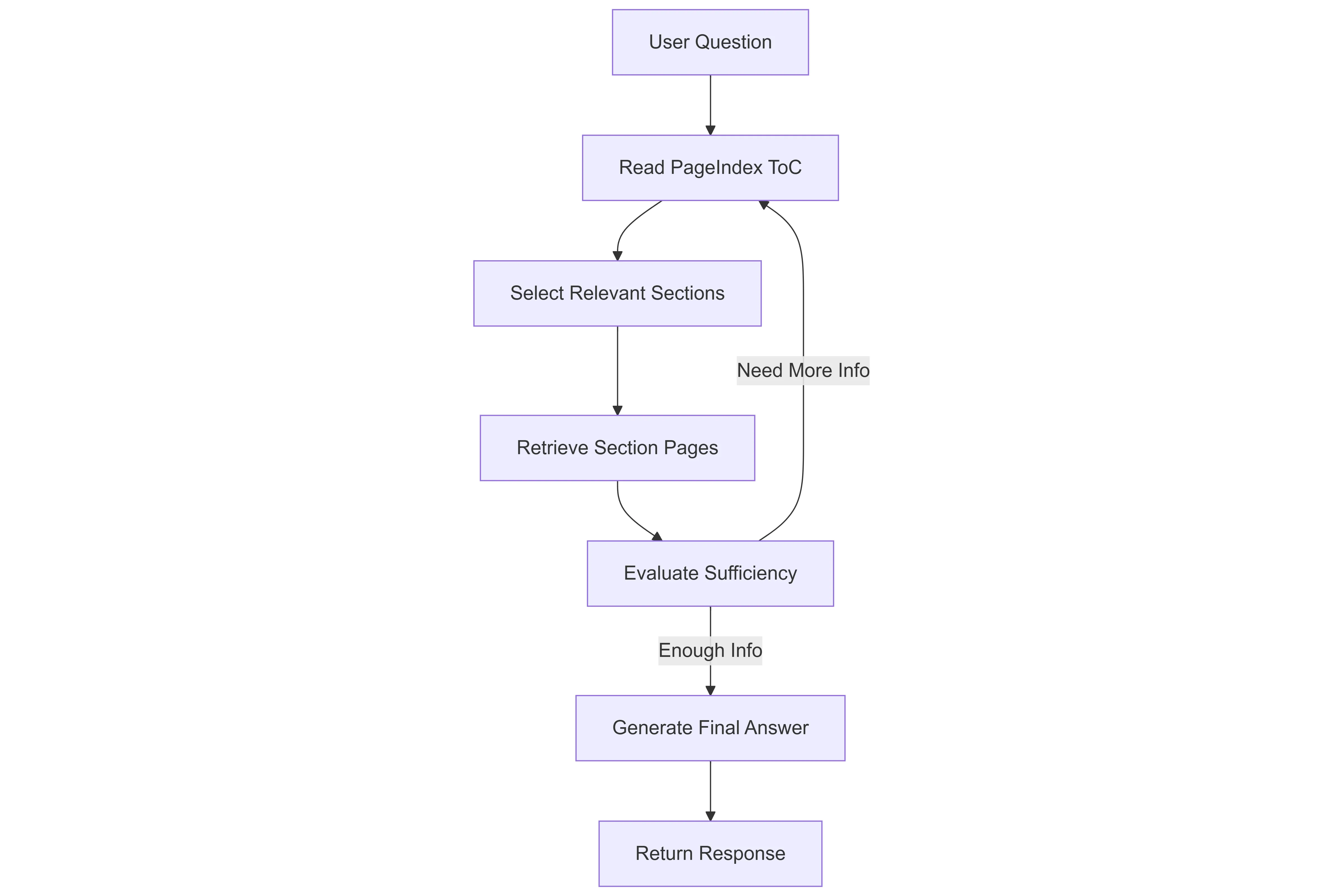 Here is the Langgraph Workflow for the PageIndex
from langgraph.graph import StateGraph, END

def build_graph():
    graph = StateGraph(PageIndexState)

    graph.add_node("navigate_toc", navigate_toc)
    graph.add_node("retrieve_sections", retrieve_sections)
    graph.add_node("evaluate_and_answer", evaluate_and_answer)

    graph.set_entry_point("navigate_toc")
    graph.add_edge("navigate_toc", "retrieve_sections")
    graph.add_edge("retrieve_sections", "evaluate_and_answer")

    graph.add_conditional_edges(
        "evaluate_and_answer",
        should_continue,
        {"continue": "navigate_toc", "end": END},
    )

    return graph.compile()
The system loops until enough evidence is collected or a maximum iteration limit is reached.
Why This Reduces Hallucination
The model is not guessing from partial context. It reads sections progressively and verifies the answer.
Instead of retrieving broadly, it retrieves deeply.
Token Usage Differences
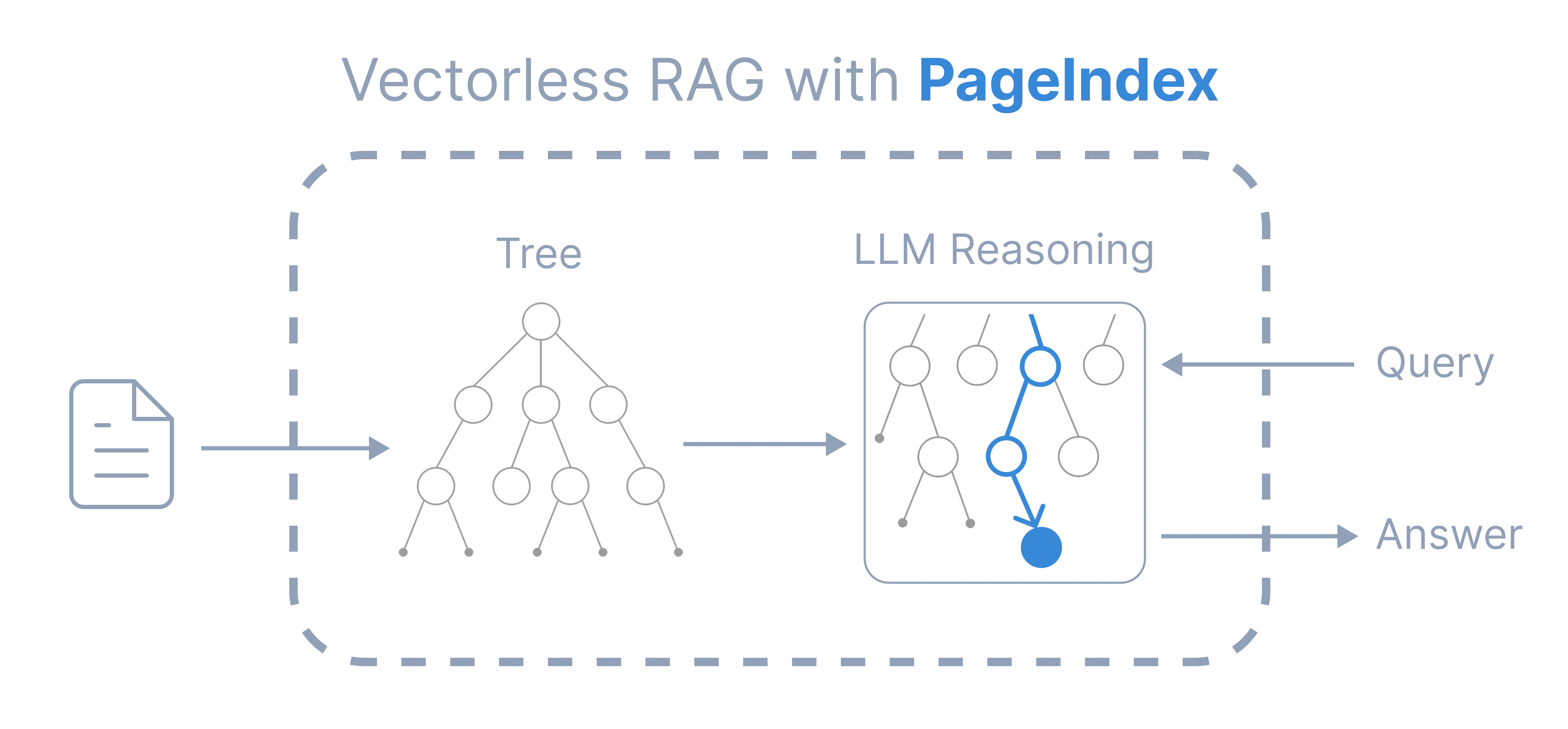
Vector retrieval sends many unrelated chunks together, wasting context window space.
Navigation retrieval sends smaller targeted context across iterations. Only chosen evidence is included.
This reduces:
- unnecessary context
- repeated text injection
- reliance on large top K retrieval
When to Use Each Approach
Vector RAG Works Best For
- FAQs
- support assistants
- conversational knowledge
- marketing content
Navigation‑Based RAG Works Best For
- SDK documentation
- technical manuals
- architecture documents
- research papers
- legal and compliance documents
The difference is the nature of knowledge: conversational versus structured.
Example: How the System Navigates a Real Question
Below is an actual console-style interaction showing how the system navigates the document instead of retrieving once.
You: how to respond cookies
[PageIndex] Reading ToC to find relevant sections... (iteration 1/5)
[PageIndex] Retrieving pages 68-69 (State Management (Cookies, Session))...
[PageIndex] Retrieving pages 65-66 (Authentication & Authorization)...
[PageIndex] Retrieving pages 26-30 (Action Results)...
[PageIndex] Evaluating if collected information is sufficient...

Assistant: - Cookies are small pieces of data stored on the client (browser) and sent with each request to the server. The server initially sends cookies to
the browser, and the browser saves them for future use. They are used to identify the user and carry lightweight data (e.g., age, name, apikey). [State
Management (Cookies, Session) (Pages 68-69)]

- How to respond with cookies in ASP.NET MVC (as shown in the document):
  - Create an HttpCookie with a name, then set its value and optional subkeys.
  - Attach the cookie to the HTTP response so the browser stores it.
  - Example from the document:
    - // GET: TryExample/Cookie
    - public ActionResult CookieT()
    - {
    -     // Setting the Cookie
    -     HttpCookie cookie = new HttpCookie("PrathamApp");
    -     cookie.Value = "Hello Dear these is the cookie";
    -     cookie["apikey"] = "dfdsafa"; // appends the cookie using &key=value
    -     Response.AppendCookie(cookie);
    -     return View();
    - }
  - Output: You can see this cookie has been set.

- Important note: Since cookies are stored on the client, they are not visible in the browser’s developer tools as server-side storage; they are managed on the
client and sent back with each request to help identify the user. [State Management (Cookies, Session) (Pages 68-69)]

- In short: to respond with cookies, create an HttpCookie, set its values, and use Response.AppendCookie(cookie) to send it to the client. The browser then
stores it and includes it in future requests. [State Management (Cookies, Session) (Pages 68-69)]
What This Demonstrates
Notice what happened internally:
- The model first inspected the document structure (Table of Contents).
- It selected multiple locations — not paragraphs.
- It read several connected sections.
- Only after collecting enough evidence did it answer.
This is fundamentally different from vector retrieval, which would typically return a few isolated paragraphs once and immediately attempt to answer.
Conclusion
Vector RAG made external knowledge practical for language models and continues to be the correct choice for many applications. Large documentation, however, presents a different problem because the challenge is not finding similar text but finding the correct location of information. Providing the model with a structured map of the document and allowing it to navigate sections step by step turns retrieval into a guided reading process rather than a one time search. This approach does not replace vector RAG and instead complements it, since similarity retrieval works best for semantic knowledge while navigation works best for structured knowledge. In practice, selecting the right retrieval strategy often matters more than simply choosing a larger model.